

CONTENTS
Why Board-Style Alert Triage Works for Cloud Security Teams


CEO & Founder at Cyscale
Tuesday, March 17, 2026


Updated: March 20, 2026
If your team is dealing with code, vulnerability, container, or runtime risk, Cyscale helps you cut through alert volume and understand what actually matters in production. You get practical context, faster triage, and a cleaner route to remediation.
Most security queues are built to store findings, not to move work.
That difference matters more than many teams realize.
When a cloud security issue or a code vulnerability is discovered, the real work is not the alert itself. The work is everything that follows:
- validation,
- prioritization,
- investigation,
- ownership,
- remediation,
- and verification.
That is why a board-style workflow is so effective. It treats security operations as a delivery system, not just as a reporting surface.
Teams already understand this in tools like Jira, Linear, and other Kanban systems. Work moves through stages. People need to see what is new, what is blocked, what is being fixed, and what is actually done. Security is no different.
In fact, security often benefits from this model more than engineering backlog management does, because security work usually crosses multiple owners and multiple systems before the risk is truly reduced.
The core problem with flat alert tables
Tables are useful for search, filtering, exports, and raw analysis. They are much weaker as a daily operating model.
The problems show up quickly.
Open means too many different things
An alert that was never reviewed, an alert waiting on platform engineering, and an alert with a fix already deployed can all still appear as open.
That makes the queue hard to trust. It also makes it hard for leadership to understand where the team is spending time.
Ownership is usually incomplete
Cloud security and code vulnerability management rarely belong to one team from start to finish.
A single issue may involve:
- security validation,
- an AppSec review,
- a platform or DevOps owner,
- a service owner,
- and sometimes compliance or risk stakeholders.
A flat list does not show handoffs clearly enough.
Blockers disappear into the backlog
Some issues are blocked because the team is waiting for:
- more asset context,
- a maintenance window,
- a dependency upgrade,
- a product team decision,
- or an exception review.
Without a visible blocked state, these items just look old or neglected.
Closure is too easy to fake
In security, done should not mean "someone changed the status."
Done should mean:
- the risky condition was changed,
- the alert was rechecked,
- and the path to impact is reduced or removed.
That standard is much easier to enforce when the workflow is explicit.
Why a board model works better
A board makes work visible as flow.
That is the key benefit.
When a team uses a board, they can answer operational questions immediately:
- What just arrived?
- What is under investigation?
- What is waiting on another team?
- What has a clear owner?
- What is close to closure?
- What is stuck?
This is why Jira boards and Linear boards are effective for engineering execution. The same logic applies to security operations, especially when the goal is not just awareness, but reduction of risk.
For Cyscale, this is particularly relevant because cloud security and code vulnerability management are already context-rich workflows. Once findings are linked to assets, exposure, identities, packages, and owners, a board becomes a natural way to run the work.
Where board-style triage is especially strong
This model is valuable across multiple security motions, but it is especially strong in two areas.
1. Cloud security operations
Examples:
- posture findings on exposed assets,
- IAM risk and entitlement cleanup,
- public storage or database exposure,
- Kubernetes drift,
- investigation-driven alerts,
- and compliance findings that need real remediation.
These issues usually move across teams and often need verification after a fix.
2. Code vulnerability management
Examples:
- SCA findings that affect running services,
- secret leaks tied to active credentials,
- SAST issues in exposed application paths,
- vulnerable packages in public workloads,
- and ASPM-driven findings that connect repositories to cloud services.
These are not just "developer issues." They often require shared triage between AppSec, engineering, and cloud teams. A board handles that shared workflow better than a flat report.
The wrong way to copy Kanban into security
A board is not automatically useful just because it looks like Jira or Linear.
The wrong approach is to add columns and move cards around without changing the operating discipline behind them.
That creates a cosmetic board.
A useful board requires:
- clear status definitions,
- enough card context,
- ownership rules,
- aging rules,
- verification rules,
- and regular review habits.
Without those, the board simply hides the backlog in a prettier layout.
A practical board model that works
Most teams do not need a complicated workflow.
A very effective starting board for cloud security and code vulnerability management looks like this:
- New
- Investigating
- Needs owner
- Fixing
- Ready to verify
- Done
You can add Blocked if your team regularly needs it, and many do. But it should be used intentionally, not as a catch-all.
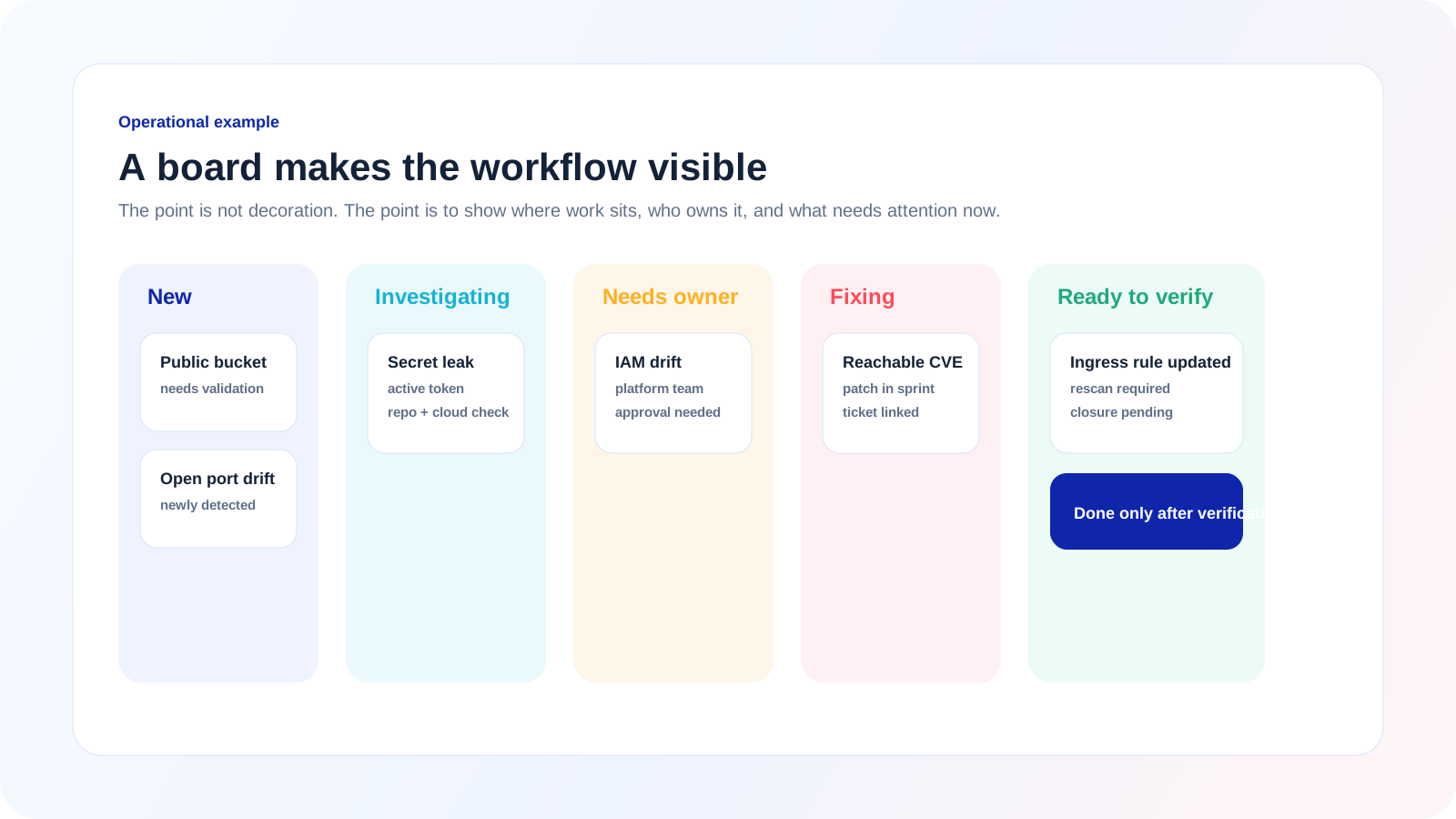
Example: a useful board makes the workflow visible. You can immediately tell what is new, what is waiting, what is being fixed, and what still needs verification.
New
The issue exists, but nobody has validated it yet.
Questions answered in this stage:
- Is this a real issue?
- Is it duplicated?
- Is the alert still active?
- Does it belong in this team’s queue?
Investigating
The issue looks real and now needs context.
Questions answered in this stage:
- Which asset, workload, repository, or service is affected?
- Is it public, privileged, or tied to sensitive data?
- Is there an attack path or meaningful blast radius?
- Is it urgent enough for immediate escalation?
Needs owner
The issue is real, the context is clear enough, but it still has to be assigned.
This is where many programs fail. Security knows the issue matters, but the handoff is not clean enough.
Questions answered in this stage:
- Which team actually fixes this?
- Does the owner understand the issue and the expected change?
- Is there already a related task in Jira, Linear, or another execution tool?
Fixing
The remediation owner is actively working on it.
This stage should contain enough clarity to answer:
- what is being changed,
- when the change is expected,
- whether the fix is config, code, package, identity, or infrastructure,
- and whether the risk is partially reduced or fully removed.
Ready to verify
The team believes the fix is in place, but security has not yet confirmed closure.
This stage matters a lot.
It prevents teams from treating "deployed a change" as equivalent to "risk is gone."
Done
The issue was re-evaluated and no longer meets the risk condition that created the alert.
This is the only stage that should count as completed remediation.
When to use a Blocked column
Many teams need a blocked state, but it should be used with discipline.
A blocked card should always show the reason.
Good blocked reasons:
- waiting for owner confirmation,
- waiting for maintenance window,
- waiting for dependency update,
- waiting for upstream product decision,
- waiting for exception review.
Bad blocked reason:
- "No progress."
Blocked should explain what external dependency prevents movement.
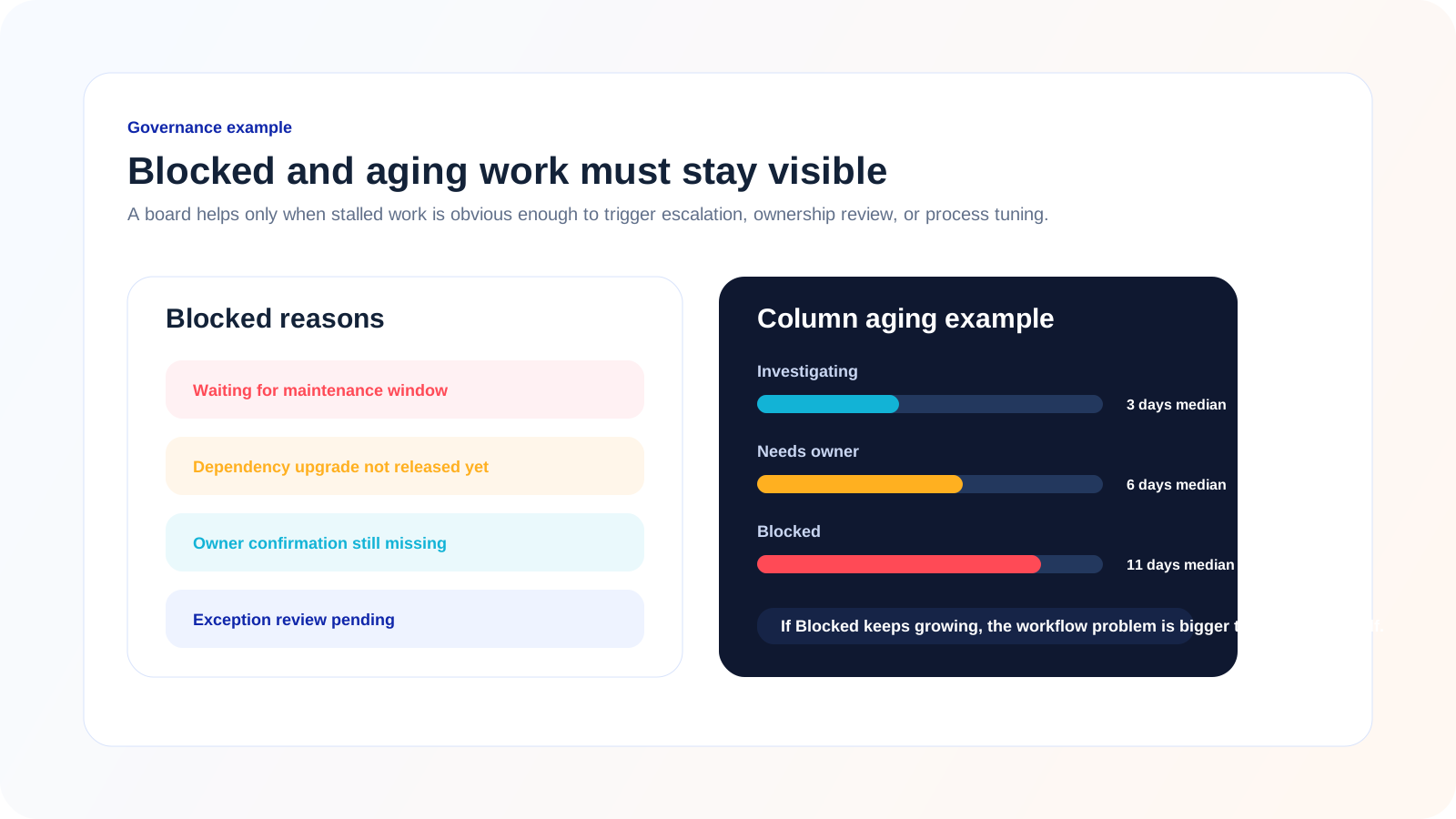
Example: blocker reasons and aging trends should be visible enough to trigger escalation and process correction, not just passive reporting.
What every security card should show
A board only works if the card itself carries enough meaning.
A strong cloud security or code vulnerability card should show:
- the title of the issue in plain language,
- the affected asset, service, or repository,
- the main risk reason,
- exposure context,
- the owner or next owner,
- the current priority,
- the age or SLA state,
- and the verification expectation for closure.
For example, a strong card is not:
CVE-2026-1142 high severity
A strong card is closer to:
Reachable package risk in public payments-api service
That phrasing already tells the team much more about why the work matters.
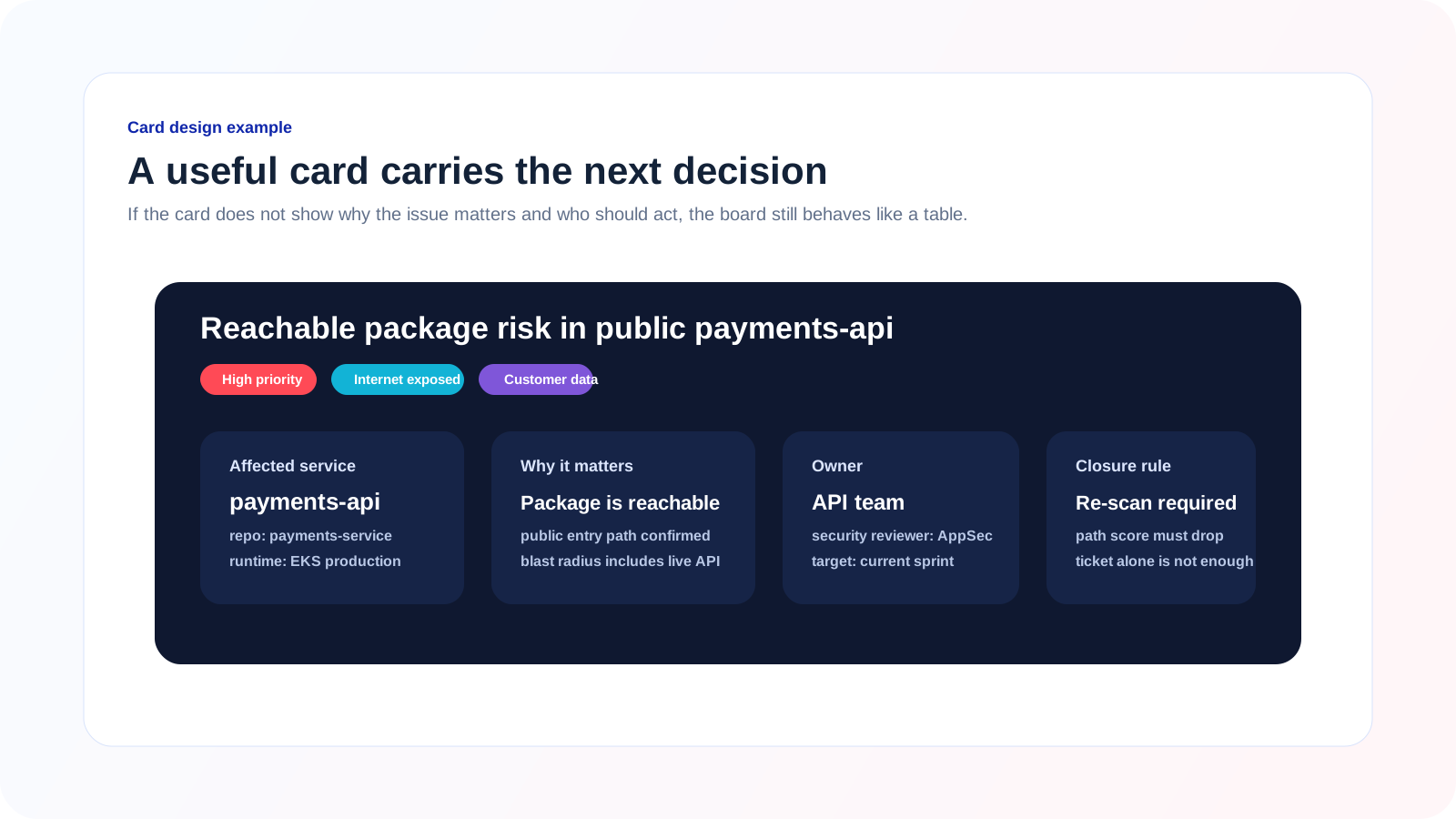
Example: when the card carries service context, exposure, owner, and closure rules, the board becomes an execution tool instead of a prettier alert list.
What context should be visible on the card
The board becomes powerful when it uses context that normally lives in separate systems.
For cloud security, that often means:
- internet exposure,
- identity breadth,
- access to sensitive data,
- production vs non-production,
- connector or cloud account,
- and linked assets.
For code vulnerability management, that often means:
- repository and service linkage,
- whether the vulnerable package is actually used,
- whether the issue reaches a public workload,
- whether the secret is still active,
- and whether the finding affects a production path.
This is one of the strongest arguments for a board in a platform like Cyscale. The more code-to-cloud context the platform can provide, the more useful the board becomes as a real execution surface.
How to use Jira and Linear with a board-style security workflow
It is fine to reference Jira and Linear here because teams already use those systems to manage engineering work, and the lessons are relevant.
Jira-style lesson: explicit workflow and auditability
Jira works well when teams need:
- clear state transitions,
- ownership history,
- SLA discipline,
- and visible blockers.
Security teams should borrow that rigor.
A board should not allow cards to jump from New to Done without investigation and verification unless the case is explicitly dismissed or marked duplicate.
Linear-style lesson: speed and clarity
Linear boards are often valued because they make workflow feel lighter and easier to maintain.
Security teams should borrow that simplicity.
Statuses should be easy to understand, and the board should stay readable even when the queue grows.
The goal is not to create process theater. The goal is to make work friction lower while preserving discipline.
What not to copy blindly
Do not copy engineering workflow details that do not help security execution.
For example:
- too many sub-statuses,
- overly abstract labels,
- or workflow steps that matter only to ticket administration.
Security boards need to optimize for triage, ownership, and risk reduction.
How to run the board day to day
This is where the feature becomes truly useful.
A board should support a working cadence, not just a view.
Daily triage
At least once per day, review:
- what entered
New, - what needs immediate escalation,
- and what moved into
Blocked.
Twice-weekly execution review
Review:
- which cards are aging in
Investigating, - which ones are stuck in
Needs owner, - and whether
Fixingitems still have realistic ETAs.
Weekly backlog health review
Review:
- which columns are growing,
- which alert types repeat,
- whether the board is filling with low-value items,
- and whether verification is becoming a bottleneck.
This is where leaders should ask:
- Are we routing too much work into the board?
- Which issues should never have become tickets?
- Which detections need better tuning?
- Where is the process breaking?
How to avoid turning the board into another noisy queue
A good board is not a dumping ground.
Use these rules:
Rule 1: not every alert belongs on the board
If a signal is low-confidence, duplicate, informational, or not operationally actionable, it should not become a board card.
Rule 2: cards must represent work
A card should exist only when somebody may need to take action, coordinate, or verify.
Rule 3: definitions matter more than visuals
If your team cannot explain the difference between Investigating, Needs owner, and Fixing, the board will degrade quickly.
Rule 4: verification must be real
If Done means "the assignee said it is fixed," the board will lose credibility fast.
How this improves code vulnerability management
This model is not just for cloud alerts.
It is especially useful for code vulnerability management because those workflows are usually fragmented across:
- AppSec,
- engineering,
- cloud teams,
- and sometimes compliance or platform operations.
Examples where a board helps:
- SCA finding in a package used by a public API,
- secret found in Git history but still active in a cloud account,
- SAST finding tied to a production authentication flow,
- vulnerable image in Kubernetes with live ingress exposure,
- ASPM issue where the code finding matters only because of the way the service runs in cloud.
These issues are ideal for a board because they require:
- contextual investigation,
- clear assignment,
- progress tracking,
- and verification.
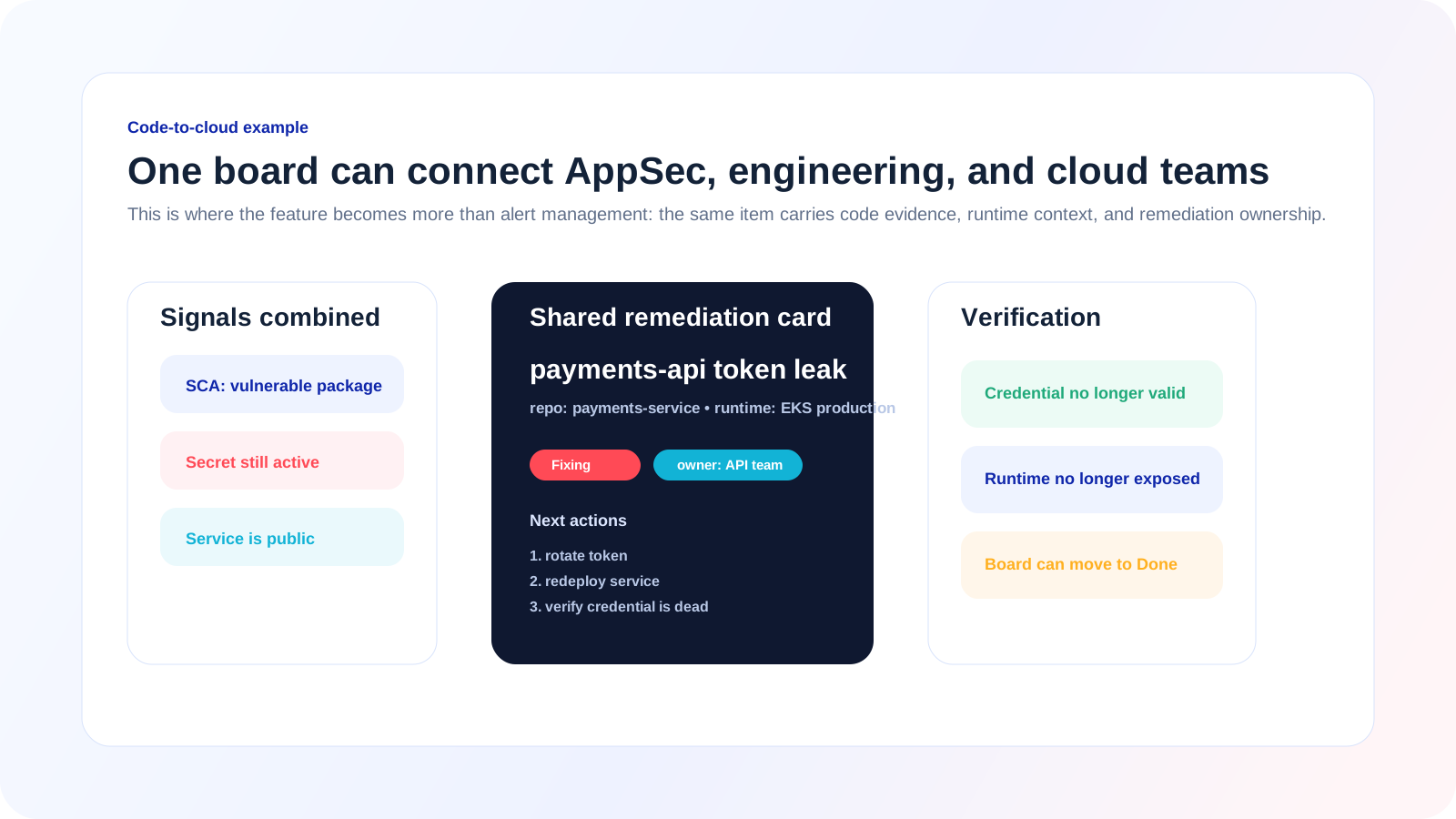
Example: this is where board-style triage becomes especially valuable for code vulnerability management. The same card can carry code evidence, runtime context, and a verification path.
What Cyscale should make strong in this experience
If this feature is going to be powerful, the value is not just the columns. It is the quality of the operational model around them.
The strongest version of this feature should make it easy to see:
- why the alert matters,
- what is affected,
- who owns the next step,
- what blocks progress,
- and what proof is needed for closure.
That means strong cards, not just strong columns.
It also means the board should connect naturally with:
- contextual alert views,
- vulnerability prioritization,
- asset investigation,
- and the code-to-cloud relationships already being built into the platform.
Recent Cyscale work on alerts overview cards, major vulnerabilities, and investigation workflows already points in this direction:
A simple rollout plan for teams
If you want to introduce board-style triage without overcomplicating the process, use this rollout sequence:
- Start with 5-6 statuses only.
- Define what each column means in one sentence.
- Define what information every card must show.
- Define a strict meaning for
Done. - Review aging and blockers every week.
- Tune what gets promoted into the board.
This is enough to get value quickly.
You do not need a perfect security workflow on day one. You do need a workflow that people can actually use consistently.
Where this connects to the rest of the platform
Board-style triage becomes much stronger when alerts already connect to:
- Attack Path Analysis
- Exposure Management
- Cloud Detection and Response
- Cloud Vulnerability Management
- ASPM and Code Scanning
Once that context is present, the board stops being a UI preference and becomes a much better way to run security work.
Final thought
Cloud security teams and code vulnerability teams do not need another view of the same alerts. They need a workflow that helps them move the right issues through investigation, ownership, remediation, and verification without losing context on the way.
That is exactly why board-style triage matters, and why it becomes much more valuable inside Cyscale. When alert cards already contain runtime context, exposure, asset relationships, and ownership clues, your team can make faster decisions and spend less time translating raw findings into action.
If you want a security workflow that feels closer to how strong teams already operate in Jira or Linear, but grounded in real cloud and code context, see Cyscale in action or request a demo.
Further reading
Cloud Storage
Misconfigurations

Build and maintain a strong
Security Program from the start.
Cloud Compliance in
2026: An In-Depth Guide
The whitepaper talks about ISO 27001, SOC 2, PCI-DSS, GDPR, HIPAA.
Download WhitepaperShare this article


Interesting? Share it


CEO & Founder at Cyscale
Ovidiu brings his cybersecurity experience to the table, innovating with AI-powered solutions that address the real-world challenges of cloud security. His approach is focused on providing SaaS companies with the tools they need to navigate the complexities of compliance and grow securely within their regulated environments.
Stay Connected
Receive our latest blog posts and product updates.
TOP ARTICLES
Cloud Security
Our Compliance toolbox
Check out our compliance platform for cloud-native and cloud-first organizations:
 CSPM ToolMulti-Cloud Data SecurityGoogle Cloud SecurityAWS Security & ComplianceIAM Cloud SecurityPrevent Cloud Misconfiguration
LATEST ARTICLES
What we’re up to


Cyscale on AWS Marketplace Simplifies CNAPP Procurement and Deployment
Why Board-Style Alert Triage Works for Cloud Security Teams


