

CONTENTS
Lifecycle Deadlines Help Teams Prevent Cloud Service Disruptions
Thursday, May 21, 2026


Cloud security teams are used to prioritizing vulnerabilities, exposed assets, excessive permissions, and failed compliance checks. But another category of risk is becoming harder to manage manually: cloud provider changes with fixed deadlines.
Examples include deprecated serverless runtimes, database engine retirements, operating system end-of-life dates, AI model retirements, and provider security changes such as minimum TLS version requirements. These are not always “security findings” in the traditional sense, but ignoring them can still break production services.
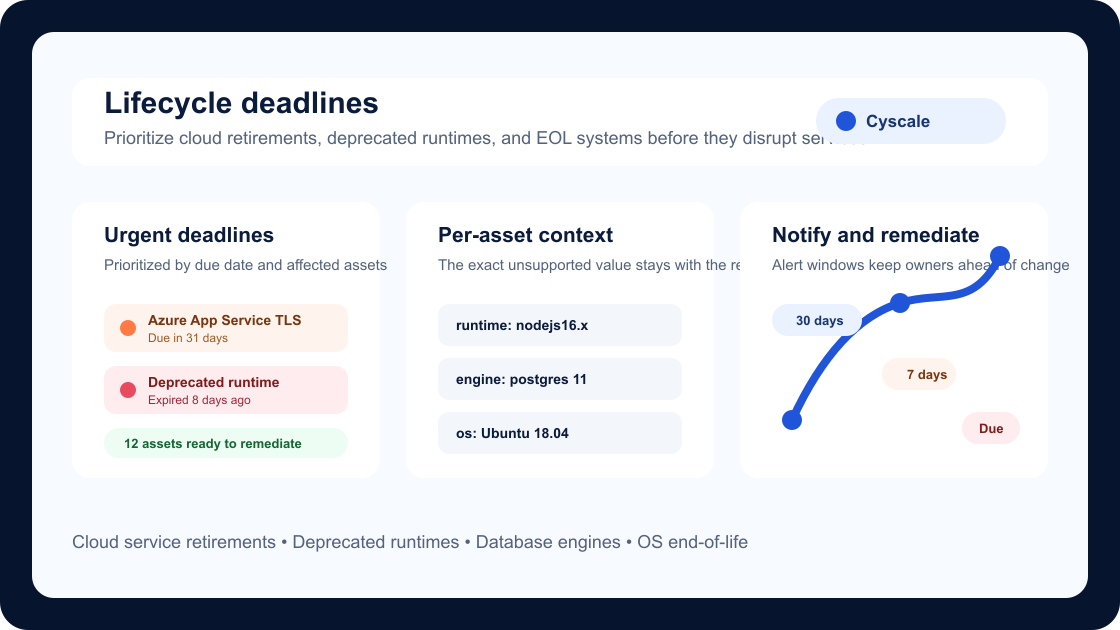
Cyscale now helps teams manage these time-bound risks with Lifecycle Deadlines.
Why Lifecycle Deadlines matter
Cloud providers regularly retire old versions, change security baselines, and remove support for outdated technologies. A resource can look healthy today and still be on a path to disruption because a runtime, engine, model, certificate mode, or operating system version will stop being supported later.
Lifecycle Deadlines make that risk visible before the deadline becomes urgent.
Instead of waiting for provider emails, spreadsheets, or last-minute migration projects, teams can review deadline-driven controls inside Cyscale and focus on the assets that need action.
What changed in Cyscale
Cyscale Controls can now carry lifecycle metadata, including:
- A due date or expiration date
- Notification windows, such as 30 days and 7 days before the deadline
- Expired status when a deadline has already passed
- Per-asset lifecycle context for the exact unsupported value
- Affected asset filtering so teams can see which resources need remediation
This means a control can represent a broad requirement, while each affected asset keeps the exact reason it failed. For example, one serverless runtime control can identify different functions running different deprecated runtimes, each with its own lifecycle context.
Examples of deadline-driven controls
Lifecycle Deadlines are useful for controls such as:
- Azure App Service resources that still allow TLS 1.0 or TLS 1.1 before a provider enforcement date
- Azure OpenAI model deployments using versions scheduled for retirement
- AWS Lambda functions running deprecated runtimes
- Alibaba Cloud Functions using unsupported runtimes
- Database instances running old PostgreSQL, MySQL, MariaDB, SQL Server, or Oracle engine versions
- Virtual machines and compute resources using unsupported operating system versions
- Kubernetes nodes running operating systems that reached end of standard support
This model also works for other lifecycle-driven risks, including vulnerable packages with fix-by expectations or product-specific deprecation notices where remediation has a deadline.
Per-asset context avoids noisy controls
Some controls check many versions at once. A function runtime control, for example, may need to detect multiple deprecated Node.js, Python, Java, or .NET runtimes.
Lifecycle Deadlines are designed to keep that context at the affected asset level. Instead of treating every deprecated runtime as the same failure, Cyscale can attach the specific value to the failed asset, such as:
runtime: nodejs16.xruntime: python3.7engine: postgres 11os: Ubuntu 18.04
This helps teams understand exactly what must be upgraded and why.
Dashboard visibility for urgent work
Lifecycle Deadlines are also surfaced where teams plan remediation. A dashboard card highlights urgent and expired lifecycle items so security, platform, and infrastructure owners can quickly see:
- What deadline is coming next
- Which controls are already expired
- How many assets are affected
- Which cloud accounts or environments need attention
The goal is simple: make upcoming disruption risk visible without forcing teams to search through every control manually.
Notifications before the deadline
Lifecycle Deadlines support reminder windows so teams can be notified before a due date. A common setup is:
- 30 days before the deadline for planning and ownership
- 7 days before the deadline for escalation
- On or after the due date for expired items
This gives security teams a better way to coordinate operational changes with platform teams, application owners, and cloud account owners.
How teams should use Lifecycle Deadlines
Start by reviewing expired and near-term deadlines first. Then group the affected assets by owner, environment, and service criticality.
A practical workflow is:
- Review the Lifecycle Deadlines dashboard card.
- Open the affected control and inspect the failed assets.
- Confirm the unsupported runtime, engine, model, TLS setting, or OS version.
- Assign remediation to the service owner.
- Upgrade, migrate, or reconfigure the asset.
- Re-assess the control and confirm the asset no longer fails.
Why this improves cloud security operations
Lifecycle risk often lives between security, compliance, and infrastructure operations. Security teams see the deadline, platform teams own the migration, and application teams understand the dependency impact.
Cyscale connects these signals to cloud assets and controls, giving teams one place to track what is affected and what needs to happen next.
For customers managing large multi-cloud environments, this reduces the chance that a provider retirement or unsupported runtime becomes an avoidable outage.
Related Cyscale resources
Register for Cyscale Platform
If you want to detect cloud service retirements, deprecated runtimes, and lifecycle risks before they disrupt production:
Further reading
Cloud Storage
Misconfigurations

Build and maintain a strong
Security Program from the start.
Cloud Compliance in
2026: An In-Depth Guide
The whitepaper talks about ISO 27001, SOC 2, PCI-DSS, GDPR, HIPAA.
Download WhitepaperShare this article


Interesting? Share it
TOP ARTICLES
Product
Our Compliance toolbox
Check out our compliance platform for cloud-native and cloud-first organizations:
 CSPM ToolMulti-Cloud Data SecurityGoogle Cloud SecurityAWS Security & ComplianceIAM Cloud SecurityPrevent Cloud Misconfiguration
LATEST ARTICLES
What we’re up to





Cyscale on AWS Marketplace Simplifies CNAPP Procurement and Deployment

EU AI Act Enforcement: How to Keep AI Cloud Infrastructure Compliance Ready

Code Security and AI Security Need Cloud Context


